Category Archives: Tools

Introducing Google Health


Still under beta at the time of writing this article, coming from Google Labs, a new approach by Google to help the public with their medical history. The way I think about it is that this new tool will help you take back control of your life.

How?
By providing more than just medical history management tool for you.

You will get many options as soon as you sign in with your Google account (with a very strict privacy policy):
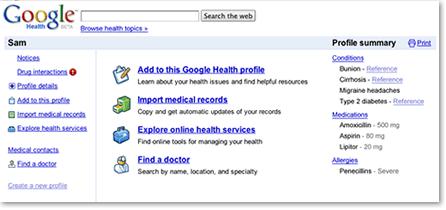
1. Store and manage all your health information in one place. And it’s completely free.

2. Start tracking a medical history and learn about your conditions.

3. You can import your medical records.

4. View your history.

5. Find out how medications might interact (Which is very useful) as Google Health will automatically check any interactions may happen between your drugs, allergies and stored conditions. Then provide you with tips, all in one place.

6. Make your health information work for you.
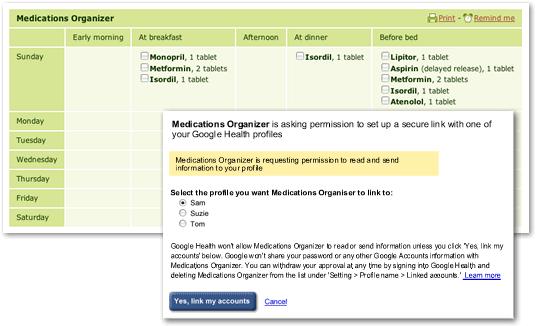
Refill prescriptions online, ask for a second opinion, or get personalized health information based on your profile.

7. Search for doctors and hospitals. integration with Google Maps and info is seamless from within Google Health (My personal favorite option in this tool).

You can sign up (Or sign in) for a Google Health account by going to the Google Health Homepage.

Technorati Tags: , , , , ,

WordPress 2.7 is here!

After playing around for a couple of weeks with the new WordPress 2.7 interface on beta, I am happy that WordPress.org announced the stable version today. (download at: http://wordpress.org/)

Here is what they have mentioned in their release:

The first thing you’ll notice about 2.7 is its new interface. From the top down, they’ve listened to our feedback and thought deeply about the design and the result is a WordPress that’s just plain faster. Nearly every task you do on your blog will take fewer clicks and be faster in 2.7 than it did in a previous version.

Next you’ll begin to notice the new features subtly sprinkled through the new interface: the new dashboard that you can arrange with drag and drop to put the things most important to you on top, QuickPress, comment threading, paging, and the ability to reply to comments from your dashboard, the ability to install any plugin directly from WordPress.org with a single click, and sticky posts.

Digging in further you might notice that every screen is customizable. Let’s say you never care about author on your post listings — just click “Screen Options” and uncheck it and it’s instantly gone from the page. The same for any module on the dashboard or write screen. If your screen is narrow and the menu is taking up too much horizontal room, click the arrow to minimize it to be icon-only, and then go to the write page and drag and drop everything from the right column into the main one, so your posting area is full-screen. (For example I like hiding everything except categories, tags, and publish. I put categories and tags on the right, and publish under the post box.)

For more, check this video in HD:

Update: As of right now, there are 87,441 downloads for WP 2.7!
Now that’s powerful!
Another update:
As of 12/13/08 there are 222,905 downloads. To keep track with the downloads counter go here.
And to read more about the new WordPress, go here.

They’ve really gone nuts with this one!

I can’t believe they’ve done this!

I just got word from Gideon Shalwick from Become A Blogger that they’ve just released the audio version of their, now slightly famous, Roadmap To Become A Blogger.
As if The Roadmap report wasn’t enough by itself!
The report has already been downloaded 6,746 times, and it’s not even been two days yet! That’s just crazy.
It looks like the report has gone viral, so people must really be loving the information inside it.
But in any case, I know you’re busy, so you can simply just go and grab both The Roadmap To Become A Blogger report, as well as it’s companion audio at the following page:
Go Here
Once you’ve signed up, you’ll get immediate access to both the report, as well as the audio file.
Talk about over delivering…
By the way, If you’ve already signed up for The Roadmap report, Gideon will have already sent you a link to the audio file.
So, no need to sign up twice.